
 With the end of the year fast approaching I needed a new laptop but with the lifecycle of the Macbook Pro’s near their limit and the possibility of some new technology so close to the horizon I decided to save a little money and build a hackintosh with a Dell Mini 10v.
Research Required
This wasn’t undertaken lightly. Even though I have a long background in technology I don’t have a lot of time to spend tinkering. All I needed was another time sink.
It all begins with netbook selection. There are a number of netbooks out there, some work well, others not so well. BoingBoing has a matrix up (last updated July 09) of compatibilities of Netbooks.
Luckily there is a lot of community out there trying to make this possible.
- Gizmodo’s How-to Hackintosh (getting dusty but got me started)
- My Dell Mini, forum community.
- Mechdrew, the guides and drivers (from meklort) you need.
In a Nutshell
With those three sites you can do this in less than 4 hours (being very literate) on a Dell Mini 10v.
- Install Snowleopard OSX onto USB Key (>=8gb) with NetbookBootMaker
- Downgrade Bios A06 to A05
- Reboot Mini onto USB Key
- Install Snowleopard 10.6 onto Mini
- Finalize Install with NetbookInstaller
- Upgrade to 10.6.2
- Enjoy!
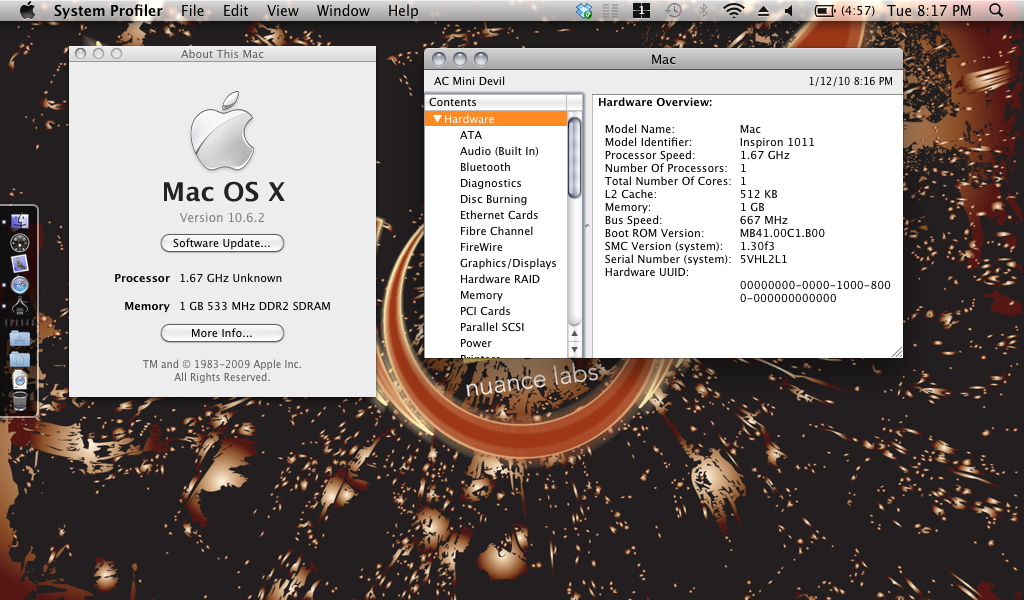
None of this would be possible without the spare time of dedicated individuals who want to see this happen. Hopefully someday Apple will allow others to run OSX without needing the Lexus machinery underneath.
Trials, No Errors
Experiences vary but for myself I have had nothing but pleasant ones. USB, Camera, Touchpad, Bluetooth, Audio, all work as they should.
The first thing I setup was Dropbox and with their new local-lan sync all my files we’re ready to use in about 20m. I don’t think I’ve ever setup a computer this fast.
Without the extended battery you’re looking at less than 2 hours of work time. Being that my stints go longer than that I went ahead and got the extended battery and writing blog articles and general surfing give about 5h of time.
Going beyond the basics of iWork, OpenOffice, etc I’ve installed photo processing applications Lightroom and Aperture. The computer wasn’t built for them but they do an admirable job and get the process of processing pictures well underway. Using such processor intensive applications however will suck the power out of your battery at a pretty alarming rate.

Personalizing Your NetBook
The machine is no longer as advertised, it’s mine, and what better way to showcase that than by getting your own skin for it. Again in the forums there was talk of a number of different skin providers but the designer in me wanted my own creation so I went with UniqueSkins. For a little over $14 I got one of the advanced 3M re-applicable decals and it is so sharp.
The Downside
For what it’s worthy I don’t have much of a con list yet, I haven’t hit my head enough. The trackpad is probably the only thing I am having trouble using from MBP & iBook (now Macbook) experiences. While it works and seemingly without issue, I can’t seem to adapt yet to it’s style. There are a few nice bluetooth enabled mice I’m looking at but the need hasn’t driven me that far yet. I’ll probably end up using my wireless Wacom tablet as an intermediary.
The Upside
This unit replaces my kick around iBook G4. It’s got a better processor, 1/3rd of the weight, and more HDD than I had for a cost of about $400. This little machine will carry most of what you have to do on an average day well and get you ready to be back at your larger machine efficiently. I even find myself using vnc/screen sharing to it to write things like this article. Then whenever I pick it up I’m already where I need to be. That’s pretty cool.
Even though this machine is more or less tiding me over until the next generations come out I think I’ll have use of this machine for many years to come as it’s too easy and able.